Amber Waves
Platform
Mobile app · B2B wholesale ordering
My Role
UX/UI Design
With
Ops, engineering
Timeline
2 months

The OPPORTUNITY
The app existed. Nobody used it.
Amber Waves Farm built a wholesale ordering app to replace the texts and spreadsheets overwhelming their wholesale manager, Isabel. It launched. Chefs kept texting her anyway. A second attempt had to actually solve the problem, not just ship a cleaner version of the first one.
Discovery
I was brought on by the designer who'd led the original build and the research effort, to own UX & UI. The team interviewed Isabel, sampled customer correspondence to understand their ordering patterns, and spoke with a wholesale customer to understand how chefs actually work. What emerged was that the app wasn't failing because of bad UI. It was failing because it didn't understand the workflow it was supposed to replace.


Sample messages sent to Isabel
Key Findings
01
The status quo is time consuming
Chefs texted or emailed orders to Isabel. She manually transferred each one into a spreadsheet — every single week, for every single customer
02
Missed deadlines hurt everyone
Service ends at 11pm. The order deadline is midnight. Late orders meant midnight texts to Isabel and chefs scrambling to substitute ingredients the next morning.
03
Customers needed a reason to change
Chefs didn't see how the app helped them. Texting Isabel felt easier — she handled all the complexity. The app offered no clear advantage over the existing behavior.
The insight that changed the design
Reading through Isabel's messages, a pattern was impossible to miss: nearly every chef was ordering the same things, in the same quantities, week after week — with minor adjustments. I built a persona around "Chef Cook": a restauranteur who is time-pressured, consistent, and deeply skeptical of change. If the app could remember his order for him, he'd never have to build it from scratch again.
User persona
It’s 11:45pm. Service just ended. The order deadline is midnight. Chef Cook needs to reorder the same items he orders every week, but the app requires him to build the cart from scratch. He pulls out his phone and texts Isabel instead.
Chef Cook
Head Chef · Cook’s Kitchen, Brooklyn NY
Frustrations
Service ends between 10–11:30pm, leaving little time before the midnight cutoff.
No way to check if a specific ingredient will be available again next week.
Building the same cart from scratch every week wastes time he doesn’t have.
Needs & goals
Plan menus further in advance, not the night before delivery.
Make special requests without a back-and-forth text thread.
Hand ordering off to his sous chef — but the process is too complicated to delegate.
“
I want to hand off the ordering to my sous chef, but the process is too complicated right now.
Design Strategy
Incentivizing the ordering process
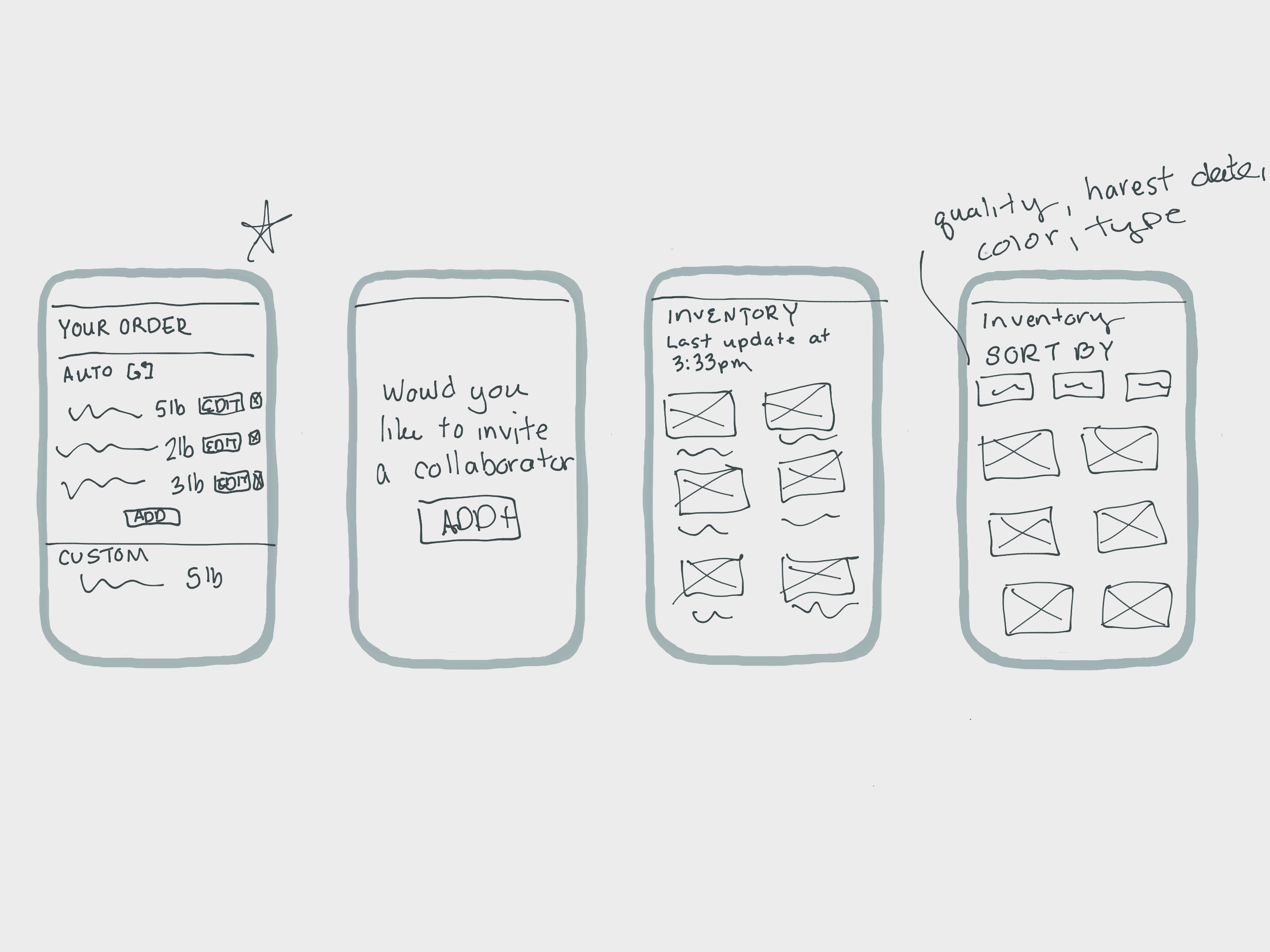
Based on the insights from research I started designing a recurring orders feature called "pantry items" that lets chefs designate staple ingredients with a quantity and delivery cadence. The app pre-populates their weekly order with those items automatically. The result? Chefs only adjust what changed, Isabel stops getting midnight texts, and the app finally has a reason to exist.

Key Design Decision
The first approach I explored put pantry items behind a dedicated tab. It failed the same test the original app failed: it required an intentional navigation step at the moment of highest time pressure. The second approach surfaces pantry items automatically at the top of the basket on order day — removing the decision entirely.
Saved orders tab
A dedicated section chefs navigate to for recurring items. Requires deliberate action at 11:45pm after a full service shift. Same friction, different name.
Inline pantry section in the basket
Pantry items appear automatically at the top of the cart on order day. No navigation required. Cart default state changes from empty to ready.
What the pantry items feature does
Four problems, one feature. Each directly mapped to a research finding.
Frees up employee time
Staple reorders happen automatically — no more manual spreadsheet entry for Isabel each week.
Creates room for growth
Recurring orders let the farm forecast demand and plan field allocation further in advance, season to season.
Creates security for clients
If a chef places their order through the app, their staple items are already queued — even if they miss the deadline.
Speeds up ordering
Chefs only edit what's different each week. The cognitive load of reordering drops to near zero.
The Solution
The flow has three stages. The goal was to make setup fast enough to feel worth doing once, and ordering fast enough to beat a text message.
1
Setup: mark an item as a pantry staple
From any product page or past order, chefs mark an item as a pantry item and set a quantity and cadence — every Tuesday, every Friday, or custom. Takes about 10 seconds per item. Only needs to happen once.
2
Order day: pantry items appear in the cart automatically
When a chef opens the app before a delivery day, their pantry items are already in the basket — pre-loaded with the right quantities. The default state of the cart is no longer empty.
3
Adjust what changed, then finalize
Chefs increase or decrease quantities, remove an item for the week, or add something new. Hit "Finalize Order". In the morning Isabel sees it in her dashboard in the morning, no texts required.
Before VS After
BEFORE

BEFORE: It's 11:45pm and Chef finishes service. The order deadline in 15 minutes. He texts Isabel: "same as last week plus 2 extra lbs of basil." Isabel is asleep and doesn't see it until the morning, after the harvest cutoff. He has to call a different supplier.
After
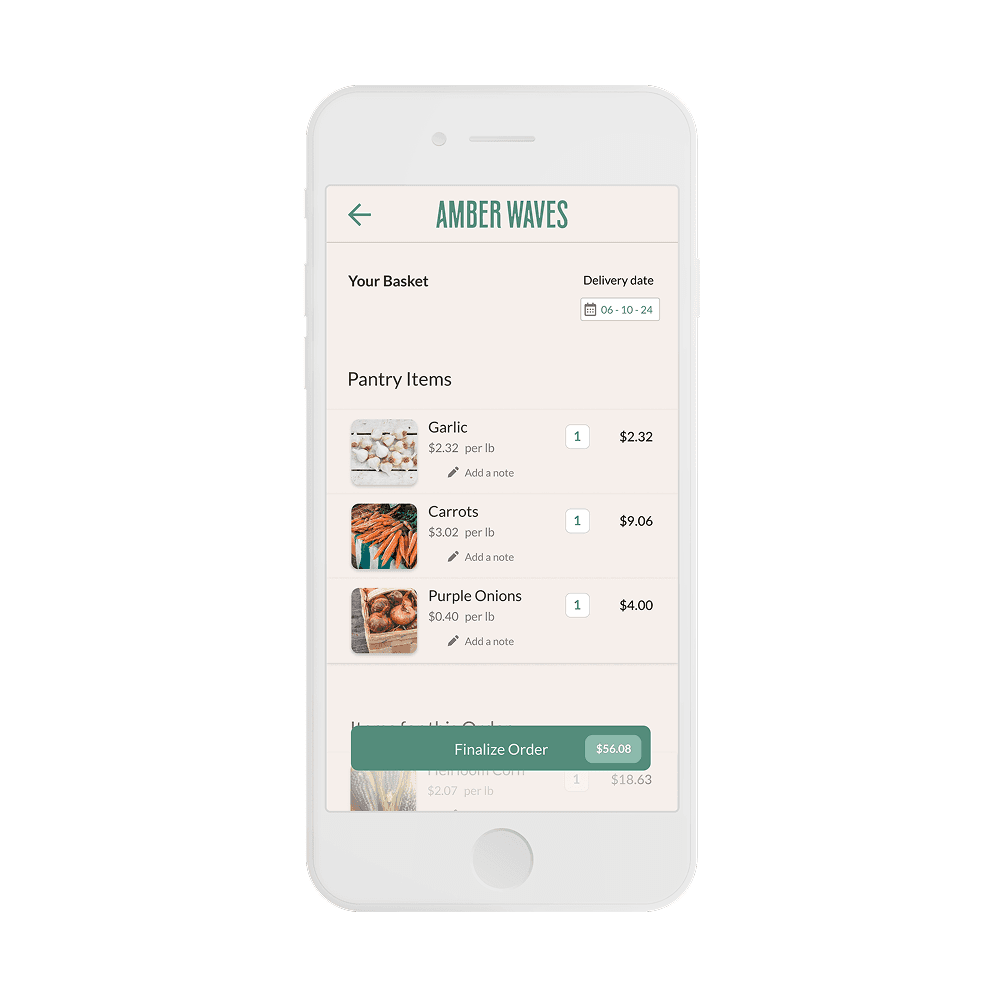
AFTER: Chef opens the app at 11:45pm and the pantry items (garlic, carrots, and purple onions) are all pre-loaded with the right quantities. He adds 2 lbs of basil, hits "Finalize Order". Done in 90 seconds. Isabel sees it in her dashboard in the morning, complete and already harvested.

